
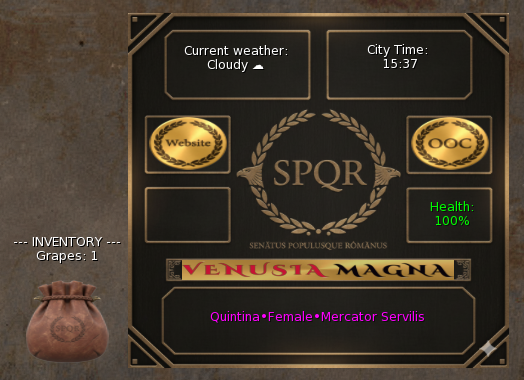
The Venusia Magna HUD is your direct connection to the Empire and the living, breathing environment of our Sim. It translates the deep mechanics of Roman life from the synchronized weather that dictates your travels to the complex health system that ties your character’s well-being to their hunger and survival. Understanding and utilizing the HUD is important for seamless, high-fidelity Roman roleplay in Second Life, making sure that you are always operating under the rules and timeline of Venusia Magna.
Table of Contents
Required Setup and Synchronization Protocol
The Venusia Magna HUD is the central nervous system of our Sim, giving some important environmental synchronization and managing your character’s physical state and inventory. The correct attachment order is imporant to make sure it syncs properly with the database.
1. Attachment Order (CRITICAL)
To make sure your unique character data, status, and inventory correctly sync with the main Venusia Magna server database, you MUST follow this exact sequence:
- Attach the Titler FIRST. The Titler contains your basic legal identity (Name, Status, Familia). This must be read by the database before any mechanics are applied.
- Attach the HUD SECOND. Once the Titler has been attached, attach the HUD and it will synchronize your health, inventory, and environment.
2. Combat Attachments (RCS)
The separate RCS (Roleplay Combat System) attachments are ONLY required for combat roleplay, such as practicing in the Arena or getting in a fight. They are not needed at all times for daily activities or standard roleplay.
Synchronized Environmental Display
The HUD makes sure all players in the Sim experience the same continuous environment.
1. Current Weather Status
- Synched Weather: The HUD displays the Current Weather (e.g., Clear Skies, Drizzle, Light Snow). This status is synchronized across every roleplayer on the Sim.
- Roleplay Requirement: You are expected to roleplay the weather displayed on the HUD (e.g., seeking shelter during rain, complaining about the heat).
2. City Time and Speed
- Synched Time: The HUD displays the City Time (the IC time of day). This time is the same for every roleplayer, ensuring everyone experiences the same sun position and time-based events.
- Faster Passage: Time passes slightly quicker in Venusia Magna than in the real world (Out-of-Character Time). This allows for a more dynamic IC day/night cycle, enabling more narrative development in shorter periods.
3. Profile Details
This section of the HUD confirms your IC identity and legal standing:
- Name: Your IC Name (Tria Nomina, Slave Name, etc.)
- Gender: Your IC Gender
- Role/Status: Your current role within the City (e.g., Mercator Servilis, Gladiator, Servus).

Core Roleplay Mechanics: Health and Survival
The Health system drives essential daily roleplay from commerce and crafting to survival and physical struggle.
1. Health and Hunger Connection
- Health: Starts at 100%. This reflects your character’s overall physical well-being.
- Hunger Link: Your Health is directly linked to your Hunger level. The hungrier your character is (due to lack of regular feeding), the faster your Health will decrease.
- Illness: Your character can catch Illnesses. Illnesses cause a continuous, slow drain on Health.
2. Health Restoration and Incapacitation
- Restoration: Food restores Health. Eating is a mandatory IC activity. You can either buy food from other players or craft food using the Inventory system.
- Incapacitation: If your Health reaches 0%, your character is Incapacitated. This means they are physically unable to move.
Inventory and Crafting System
The HUD integrates a practical inventory for gathering, storing, and utilizing resources.
1. Inventory Updates
- Your Inventory screen updates whenever you harvest raw materials (e.g., meat, grapes, carrots) or craft new items.
- Storage: The HUD automatically stores gathered ingredients.
2. Resource Utilization
- You can use the ingredients stored in the HUD to make finished goods, such as food, wine, furniture (coming soon), and more.
- Roleplay Loop: This system creates a powerful roleplay loop: gather resources → craft product → sell product (for profit) or consume product (to restore health).
Essential Controls and Navigation
The HUD includes two imporant external buttons for community access and setting your availability.
1. OOC Button
- Function: Toggling this button sets your HUD and Titler to OOC (Out-of-Character).
- Protocol: This alerts everyone around you that you are not available for roleplay and should not be addressed in-character. Use this when AFK or taking a break.
2. Website Button
- Function: Clicking this button brings you directly to this very website.
- Protocol: Use this for quickly referencing rules, checking the Calendar, or finding links such as to the Gods, Rituals, and Omen Guide.